Instant Approved Directory Submission Sites List

Here Is the Few Website Which Approved Your Submission Inside 24 Hours.


Sites PR
http://www.searchseodirectory.com 2
http://www.thebusinessethics.com 2
http://www.best-casino-directory.com/ 1
http://www.traderbases.com/ 1
http://www.USAEBIZTODAY.COM 1
http://www.COOLBIZDIRECTORY.COM 1
http://www.ETRADEDIRECTORY.COM 1
http://www.ORBITDIRECTORY.COM 1
http://www.bestlinkscoast.com 1
http://www.bestwebresource.com 1
http://www.sneaklist.com 1
http://www.urwebdirectory.com 1
http://www.freedir4search.com 1
http://www.DIRMAGNET.COM 0
http://www.DIRECTORYWEBWORLD.COM 0
http://www.EXPRESSDIRECTORIES.COM 0
http://www.SEOCONNECTIONLIST.COM 0
http://www.Z3DIRECTORIES.COM 0
http://www.LIVEBINGODIRECTORY.COM 0
http://www.R4DIRECTORY.COM 0
http://www.FXONLINEDIRECTORY.COM 0
http://www.OPENTRADENOW.COM 0
http://www.SEARCHDIRECTORYONLINE.COM 0
http://www.BIZDIRECTORYSITE.COM 0
http://www.NEWEDIRECTORY.COM 0
http://www.DIRECTORY2BIZ.COM 0
http://www.THEBIZPLANET.COM 0
http://www.CLASSICDIRECTORYS.COM 0
http://www.submitalldirectory.com 0
http://www.ESURGEONDIRECTORY.COM 0
http://www.ECOUPONSDIRECTORY.COM 0
http://www.ONLINECOUPONDIRECTORY.COM 0
http://www.EPROMODIRECTORY.COM 0
http://www.ozonelist.com 0
http://www.findbestdirectory.com 0
http://www.smartdirectorys.com 0
http://www.venturedir.com 0
http://www.homewebdir.com 0
http://www.mediawebdir.com 0
http://www.stockweblinks.com 0
http://www.brakedownlinks.com 0
http://www.silverweblinks.com 0
http://www.hyperlinkwealth.com 0
http://www.advertizlinks.com 0
http://www.briefwebdirectory.com 0
http://www.linkbestplace.com 0
http://www.grepweblinks.com 0
http://www.topfindlinks.com 0
http://www.addlinksforfree.com 0

Instant Approval Forums with instant Signature posting

How to get Referral Traffic

  1. Writing a Series of posts like this one, keep your readers captivated by continuing on with a series.
  2. Try to be original, if you find out about a new product or service try to blog about it first.
  3. Write Product Reviews, I quite like this one. Write honest reviews of other peoples products then ask for a link 
  4. Write Lists, like the top ten or top twenty or even top 100 best ways to do something. These attract links like crazy when done right. They also usually do well on social networking sites like Digg or Stumbleupon.
  5. Comment on other peoples blogs, try & strike a relationship with other bloggers in your niche or topic. Once you build up a relationship you can exchange links or even ask for them to post about one of your recent entries & vice versa.
  6. Write Articles & publish them on article directories. Include links to your blog in the resource box. Make sure & use relevant anchor text like Earn Money Blogging etc
  7. Add links to your site on Wikipedia in the relevant section. So for example if your site if about pottery, add a link to your site in the relevant section. Sometimes the links get deleted if they don’t deem your site relevant enough, but sometimes the links stay & give good traffic 
  8. If you sell a product creating an affiliate program can drastically increase your exposure & also increase your incoming link count. Provided you use an SEO Friendly Affiliate Program.
  9. Include options on your site that allows visitors to email articles to friends, vote for articles & generally participate more. This will increase the chance they will recommend your site or mention it to someone else.
  10. Claim your blog on Technorati & include an “Add to Favourites” button on your sidebar. The more popular your blog becomes, the more people will add it to their favourites.

List of Do Follow Forums

http://www.vuju.com/
http://checkthisup.com
http://www.sitepoint.com/forums
http://www.thewebmasterforum.net
http://www.webmasterforums.com
http://www.allcoolforum.com
http://www.warriorforum.com
http://forums.webicy.com
http://thehyipforum.com
http://www.webmasterforumsonline.com
http://www.webmasters.am/forum
http://www.webmasterforums.net
http://www.devhunters.com
http://www.webmaster-forum.net
http://www.geekvillage.com/forums
http://www.zymic.com/forum
http://www.webmastershelp.com
http://www.webmasterdesk.org
http://www.webmasterground.com
http://developers.evrsoft.com/forum
http://www.websitebabble.com
http://www.elancetalk.com
http://www.talkingcity.com
http://www.australianwebmaster.com
http://www.wtricks.com
http://www.forums.webzonetalk.com
http://www.htmlforums.com
http://www.searchbliss.com/forum
http://www.up.biz
http://www.webmasterize.com
http://www.webmasterserve.com
 

How to get Referral Traffic

  1. Writing a Series of posts like this one, keep your readers captivated by continuing on with a series.
  2. Try to be original, if you find out about a new product or service try to blog about it first.
  3. Write Product Reviews, I quite like this one. Write honest reviews of other peoples products then ask for a link 
  4. Write Lists, like the top ten or top twenty or even top 100 best ways to do something. These attract links like crazy when done right. They also usually do well on social networking sites like Digg or Stumbleupon.
  5. Comment on other peoples blogs, try & strike a relationship with other bloggers in your niche or topic. Once you build up a relationship you can exchange links or even ask for them to post about one of your recent entries & vice versa.
  6. Write Articles & publish them on article directories. Include links to your blog in the resource box. Make sure & use relevant anchor text like Earn Money Blogging etc
  7. Add links to your site on Wikipedia in the relevant section. So for example if your site if about pottery, add a link to your site in the relevant section. Sometimes the links get deleted if they don’t deem your site relevant enough, but sometimes the links stay & give good traffic 
  8. If you sell a product creating an affiliate program can drastically increase your exposure & also increase your incoming link count. Provided you use an SEO Friendly Affiliate Program.
  9. Include options on your site that allows visitors to email articles to friends, vote for articles & generally participate more. This will increase the chance they will recommend your site or mention it to someone else.
  10. Claim your blog on Technorati & include an “Add to Favourites” button on your sidebar. The more popular your blog becomes, the more people will add it to their favourites.

15 Tips To More Than Double Your Website Traffic

15 Tips To More Than Double Your Website Traffic


Your articles don't get you enough traffic. Why?

If you follow the below tips, there is no reason you won't get the maximum possible traffic. 
 
1. Make 3 versions for each keyword, not spun rewrites. Each keyword should have absolutely different different content and an unique theme, with separate emphasis. 

2. All 3 articles should be linked to at least one of the other two, preferably both. 

3. Post one on your Wordpress website or blog. One first on ezine and then other article directories. And finally one article should actually be a review, either to sell through CPA or of your website etc. 

4. Distribute all versions through content distribution blogs, forums and article syndication. 

5. Keep a keyword density of around 2% but also use related LSI keywords, once or twice each keyword and about 10 keywords per 500 words. 

6. Never use an article below 500 words and the ideal length is at least 1000 words. 

7. Use the primary keyword once in the first line and once in the last line and at least once in every para. Twice in the title, in the beginning and once in the middle.

8. Use 2 titles, both slightly edited and with a slightly modified primary keyword. 

9. Use Wordpress as far as possible. 

10. Emphasize on long tail keywords instead of short tail keywords. 

11. Always use a slightly modified keyword as alt text with an image. 

12. Always use an image. 

13. Emphasize on value and content rather than a hard sale, sometimes, that is. You can bring to your landing page and sell. 

14. Always use Facebook, Twitter etc to spread and popularize your articles. 

15. Golden Rule - Articles must be informative and valuable and not meant for a sale. The sale should be based on a combination of buyer keywords and your author box with a link to your squeeze page or landing page. The article should only be there to represent you as an authority and form a brand along with brining targeted traffic and back links as well :)

High PR Article directories

This is the list of high PR articles directories. You can submit your articles there and get more back links
1.knol.google.com
2.free articles directory
3.squidoo.com
4.ezinearticles.com
5.hubpages.com
6.examiner.com
7.articlesbase.com
8.technorati.com
9.seekingalpha.com
10.associatedcontent.com
11.buzzle.com
12.suite101.com
13.gather.com
14.goarticles.com
15.brighthub.com
16.selfgrowth.com
17.helium.com
18.ezinemark.com
19.pubarticles.com
20.thefreelibrary.com
21.articlesnatch.com
22.ideamarketers.com
23.infobarrel.com
24.articlealley.com
25.sooperarticles.com
26.amazines.com
27.bukisa.com
28.selfseo.com
29.triond.com
30.articledashboard.com
31.web-source.net
32.articlerich.com
33.isnare.com
34.articleclick.com
35.articlecity.com
36.submityourarticle.com/articles/
37.articlesfactory.com
38.articleblast.com
39.articlecompilation.com
40.articletrader.com
41.upublish.info
42.xomba.com
43.EvanCarmichael.com
44.biggerpockets.com/articles
45.articleslash.net
46.searchwarp.com
47.articlecube.com
48.thewhir.com/find/articlecentral
49.snipsly.com
50.site-reference.com 

Do-Follow Forum List

Hey, here are some do-follow supported forum list. Save them, I think these might help you.

1.http://forums.digitalpoint.com
2.http://www.vuju.com/
3.http://checkthisup.com
4.http://www.sitepoint.com/forums
5.http://www.thewebmasterforum.net
6.http://www.webmasterforums.com
7.http://www.allcoolforum.com
8.http://www.warriorforum.com
9.http://forums.webicy.com
10.http://thehyipforum.com
11.http://www.webmasterforumsonline.com
12.http://www.webmasters.am/forum
13.http://www.webmasterforums.net
14.http://www.devhunters.com
15.http://www.webmaster-forum.net
16.http://www.geekvillage.com/forums
17.http://www.tips.biz
18.http://www.webmastershelp.com
19.http://www.webmasterdesk.org
20.http://www.webmasterground.com
21.http://developers.evrsoft.com/forum
22.http://www.websitebabble.com

21st Century Blogging!


The turn of the 21st century brought about a lot of changes, including changes in blogging. Because of the technology bloggers got a whole new way to write and present their blogs with lots of decorated items. They can now throw lots of interesting image instead of writing text as well as use short videos to intrigue the visitors. Even one can update one's blog when he is on journey with the help of a PDA or Netbook or something like that. 
There are mainly two types of blogs
1. Basic Blogs
2. Expository Blogs

Basic Blogs are mainly used for making content interesting, collecting interesting images from internet and to make their various comments.
On the other hand Expository Blogs mainly emphasize on the content of the blog like the writings of the blog. 

Again there are several other types of blogs that fall under these two main broad categories. 
Some of these include: 
• Group Blog – A variant of the same basic blogs but with multiple authors 
• Topic – Blog writing based on a specific set of topics (such as politics, news, religion, education, etc.) 
• Journals – Diaries; usually expository and of interest to the writer, family and friends 
• Photo – As the name suggests, this is a graphic heavy blog with photos, etc. 
• Linkblog – Similar to the regular basic blog but with only links and without commentary 
• Public relations – Blogs geared towards public relations, advertising, etc  
• Other – There are many other types and categories of blogs that can fall in this line as well. 

There are so many different things that blogs are used for these days.

How to increase Digg Followers


Complete Your Profile :
Firstly you have to fully complete your profile. You need to complete every possible fields of your field so that people will get necessary information about you.

You can add Facebook, Twitter, Google with your Digg account. It will help you to share your submitting link to these social networks. 

Keep Yourself Active :
You need to keep your active in Digg in order to get followers. Active means you need to submit links and digg someone others sharing urls frequently. It will attracts the eye of other users of Digg.

Follow others :
Just follow some other users on Digg. As a result sometimes they will follow you back. Again you will some unique idea about them whom you have followed already.

Digg Button :
You can add direct Digg button with your post in your website or your blog site. So that people can directly digg your url to their account.

Comment on Others Submission :
Commenting on other peoples submission will help you to make them interested about you. If your comment is good and related it will be perfect for you to get followers.

Digg Profile Link :
Digg you the option of unique profile link which will not be matched with someone others. So that you can share and advertise it to the social networks like facebook, twitter, myspace, google plus etc. It will help you to increase your followers.

YoulikeHits :
Youlikehits will be a perfect way to increase your digg followers. This will help you much more to increase it. Just set your digg account as you digg profile link. Set a high range points to follow your account.

Increase Facebook Fans

1. Suggest for liking your page:
 In your facebook fan page there appears a option named "suggest friend" or "invite friends". Click on the link and select all of your friend shown there.

Select ALL to get the quick likes. Remember in this way you can just 20-40% likes from your friends. You can use it just for once.


2. Add Widget to your website:
There are several types of facebook widget that can be used in your website to like the page directly from your website.
If you have high traffic in your site and you have customer oriented content to your site you will get rapid traffic from the widget.


3. Add the fan page url as Email Signature:
You can attach signature in your email as the facebook fan page. It will also make some valuable traffic.As the email is always private the people will be much more interested about your link.
4. Link with Twitter Account:
You can link up your facebook account with twitter account. So that twitter users can visit your facebook posts and can link your page. 
5. Add a link to your personal facebook profile:
In your facebook personal profile you can add a link of you fan page to the contact page. You can keep it just under your photo.


Characteristics of a quality comment


We need to know the system of good quality comment to get the good quality backlinks.

So it should be kept in mind that we have to maintain some rules to do some comments to some others website or blogs.

There might be lots of comment types of comment. You can only write "Nice sharing. Thnx". But this is not a nice comment at all. So let's know the ways of making quality comment. 

What we call a good comment is this:

# We must add value to the post, add an interesting idea, add a new vision about the topic
# Stay on the topic of the post, don't talk about something else
# Make a joke about something in the post if it possible.
#  Quote a sentence of the post and write a few lines about it (like: you said in the second paragraph "bla bla" but I dont think like thisbla bla)
# Reply to a previous commenter (like "@henry : I think you're right, but...")
# Never say only "good post", or "useful information", these comments will be marked as spam always time!
# Write at least 4 lines for each comment.
# Write in your best english!  The reason is that a comment written in a poor english is often marked as spam! # Please correct your mistakes before submitting your comment.

Blog Commenting is an important part of Link building or Backlinking. And Backlinking is an important part of Search Engine Optimization. So do the advertising in online Quality Blog commenting a must. It will help you to increase your earning online. 

Facebook Like : Facebook Promotion

Another nice and upcoming website is Facebook Promotion. It has almost the same mechanism as YouLikeHits do.

Just make an account there as quickly as you can.


You will get 50 points in the starting position. You have to like someone's facebook page to earn points. With these points you can make someone to like your page. After signing up you need to add your facebook page with full url of your facebook page like http://www.facebook.com/jacksonitworldnet

Again you can share some other information to earn point. And you need to loose some points to make someone to share your information url.

Advantages :
The main advantages of this site is that, here to like a page it need not to open the page. You can like it without opening the page. You can like it directly from the site. So less effort with higher benefit. The work will be much more faster.

Increase Traffic : YouLikeHits

Promoting website is a vital  factor for the developer. And for this increasing site traffic is an important part of this promotion. Lots of ways we know, but here is a new and innovative way.

There are three types of visitors mainly. One is regular visitor who visits your site and check out every part of your site. These visitors are of course important for you. But to get these types of visitors you have maintain some quality of your page otherwise it will not be possible.

Again there are some other visitors who are brought to site by force. There visitors are also important sometimes but not every time. Here I am writing about some new method of increasing visitors by force.

The keyword is YouLikeHits. 


Sign up there. A nice policy is applied here. Everytime you do something will increase your point and every time someone does something for you will decrease your point. So you need to make your point every time you have to make your work.

You can increase your twitter follower by YouLikeHits. Add your twitter profile url here in this site to increase your twitter follower. Your twitter profile url is something like this - http://twitter.com/thesaifeye. To get the follower quickly you can increase your asking point here. Here you can set your point from 2 to 10. Again you can follow someone others to increase your point.
You can increase you facebook page like. Set your facebook page by your facebook page url. Your facebook page url will be something like this - http://www.facebook.com/onlineoutsourcing. You can Like some other pages to get some point. When someone like your page some points will be cut from your account.

You can increase your digg follower. Set your digg username. Follow some others to increase your point and followed by other will decrease your point.

Again you can increase your Youtube subscriber, Myspace impression, Stumbleupon followers in the same way. You can increase your site visitors directly by setting up your site. By referring someone you will also increase 50 points. 

To follow someone or to like a facebook page what to do? Firstly you have to follow someone and finally confirm it. Only after doing these two things you will get the point. Otherwise your point will not be counted.

Add Share Button to Your Site

Sharing is somehow an important phenomenon for a site. Now a day almost every site has the share buttons. Again the free sites and blogs provide automatic sharing button on their gadget. To advertise your site or blog to other site sharing button is a vital fact. Their is no doubt that it will increase huge traffic if you can keep your advertising in track.

There are so many ways you can add the share button on your site. When using facebook you will see the share button of facebook. The code need to get the share button. Again when using twitter you will see the tweet button. Blogger, Digg, Reddit, StumbleUpon, Delicious, Google, all of these have share button. Like these sites almost every popular site has its share button. 

So now, the fact is that how can I get this share button on my site or blog. And which design of sharing button should I chose. You can certainly add some HTML or JavaScript code to your site in a suitable place to add the sharing button. There are so many ways from where you will the sharing buttons. Here are some sources given below.

Again the consideration of the sharing button should be according to your site design and color combination. Here are two pictures shown which are taken from different sites. Now here is the code for blogger service.
Download the code from the following link.


Bookmarking : Auto Bookmarking


There is no doubt that social bookmarking shortly known as bookmarking is a vital part of Search Engine Optimization. Now a days this part of SEO is also very much popular. Again it will be much more better if the bookmarking site will be highly page ranked to the search engine. Because every bookmark will get you a quality backlink. And a highly page ranked bookmark will get you a highly page ranked backlink. 

That's why to optimize one's site for search engine he has to master some techniques of bookmarking. That's why here is a nice and easy way of bookmarking for a large number of renowned sites. A nice and easy technique it is also. 

Simply go to the following site noted here.
 
Here you will  get a numbers of social bookmarking site's name including the links. And in the right side of the page you will get a filling up space. 

Give your site url or the bookmarking url you need to bookmark. Give the title of the bookmarking url. Assert some additional information about your site in the text section. And finally make some keyword of your site or page content to the tag section. Now, click on the "Generate" button to generate a ready made link to submit your site to each of the listed bookmarking sites. Press the "POST" button on bookmarking site you need to bookmark now from the left side list.


Be sure that you have been a registered member of the particular bookmarking site like Digg, Stumble Upon, reddit etc. Otherwise you will not be able to bookmark on the particular selected site. 

Help : Biggan Projukti

Increasing Traffic : Bookmarking 2

StumbleUpon :
StumbleUpon is a very important site for social bookmarking. Within all of the bookmarking site it has the highest Page Rank. It also brings lots of instant traffics to your site. First, sign up there and after logging in you will got the home page of stumbleupon. Just go the Favorite Tab. On the right side, left side of your profile picture you will got a link named "Add a site". Select the url of your webpage and the review of the site. The review should be good enough and standard also. Select one of the modes given below. And finally select Add a site to add your site to the site database of Stumbleupon. Stumbleupon has also toolbar extension for some popular browser like firefox, google chrome, internet explorer, safari, opera etc. It is thus called as discovery engine.

Delicious :
Another nice and very important bookmarking site is delicious. It's another service of Yahoo company. You can specifically sign up here. Again you can sign in with your yahoo id if you have one. Complete the profile to start the delicious account. Select "Save a new bookmark..." from the upper right section of the home page after your logging in there. A box will appear and there will be a option to place your site page url. Give your site url and select Next to go. Provide Title, Tags and Notes there to complete the full process. Save the url there. It has a hot list on its home page. Generally all the urls you have added can be viewed by public. Again you can make them private when you complete the process.

Google Buzz :
This one is going to be famous social bookmarking site now a days. One can use it if he or she has an google account where it might be gmail service. After the compose mail, inbox and sent box you will get a BUZZ option. Select it first, place your site url at the link option there. Submit the url to the friends and some others.

Reddit :
Reddit is again one of the most Page Rank and popular site for the social bookmarking technology. After signing up and logging in successfully, Select "Submit a link" on the upper top section of the site home page. Select it and finish the process by submitting your link.

Increase Traffic : Bookmarking 1

Bookmarking known as social bookmarking is another vital way to increase your site traffic or site visitors. Bookmarking means to save your site page url to somewhere. It might in your browser if you want to bookmark the url on your PC. But if you want to do social bookmarking you need to save you site page url on some several bookmarking sites like twitter, digg, delicious, stumbleupon, digo, reddit etc. Besides it will make your sites importance to the search engine. In short this is another nice and easy way of Search Engine Optimization (SEO).

Most of us is well familiar with the social site twitter. It is a social networking site, a social marketing site, a social bookmarking site and so on at the same time. We need to use it's social bookmarking section here! We need to tweet your site links as most as possible in the twitter tweet section. In twitter you will get 140 character to tweet your site link. If the site link is so much large for your site you can shorten your site link from some popular site shortening site like Bit.ly, Tinyurl, Tiny, Google url Shorterner etc. and make your tweet relevant by adding some interesting and useful words with this link. Your twitter account should have a profile picture. You need to have follower as much as possible and more than 300 follower seems standard for your account. To increase follower you can increase your following first.

A most familiar and well known bookmarking site. A nice bookmarking system also. Sign up here and verify your email afterwards. After sign in you will get a "Submit  link" section on the top left section of the home page. Click there and submit your link. It will automatically track your site content then. Just select your category and finish the process. You will submit each page of your site specifically. 

Another popular bookmarking site. This is a service of Yahoo! You need not to sign up here to use this bookmarking service if you have a yahoo account. You can log in the yahoo buzz account with your previous yahoo mail account. Just log in there and you will see a link named, "submit your link" on the top right section of your yahoo buzz home. Submit your site link there. This will also track your site content automatically and publish in yahoo buzz automatically after you give the link there.

Increase Traffic : How to Backlink

There is no doubt that backlinking is a vital section of internet marketing now a days. You cannot do the optimization of your site for search engine without this backlinking section. Backlinking brings lots of traffic to your site. And of course increase the page rank of your site.

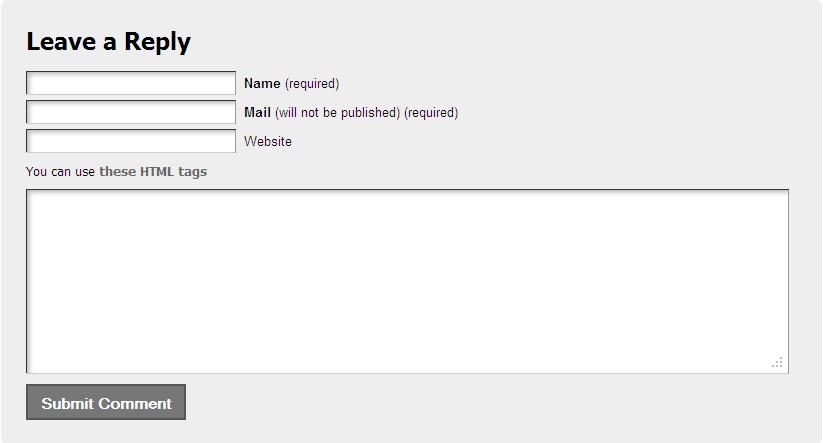
Now the question is, where and how can I do the backlinking? Generally most of sites now a days have a comment section. This comment section is provided for the feedback of the writing of that site. You can do a meaningful comment with a link of your site there. Some comments sites have a pattern to give your name, email address and site name like the following one-


In the name section you can give your name or the keyword or anchor text of your backlinks. Give your mail address in the mail adress section and give the site address of your site in the address section. Finally make a meaningful comment in the comment section. Be careful about that because most of the sites moderate all of the comments made. If your comment is not meaningful it might be deleted by the moderator.

What should be done if the site does not have the name and link section! Just check that whether the comment section supports some tags or not. If the comment section section supports HTML tags you can do the backlinks like the following format.


This HTML tags is also known as bb code, you can just use the same system to use the bb code. And if the section supports something other just use the way it need to be used.

There is terms named link exchanging. You can exchange your site links to the other site owners. This is of course another types of link building.